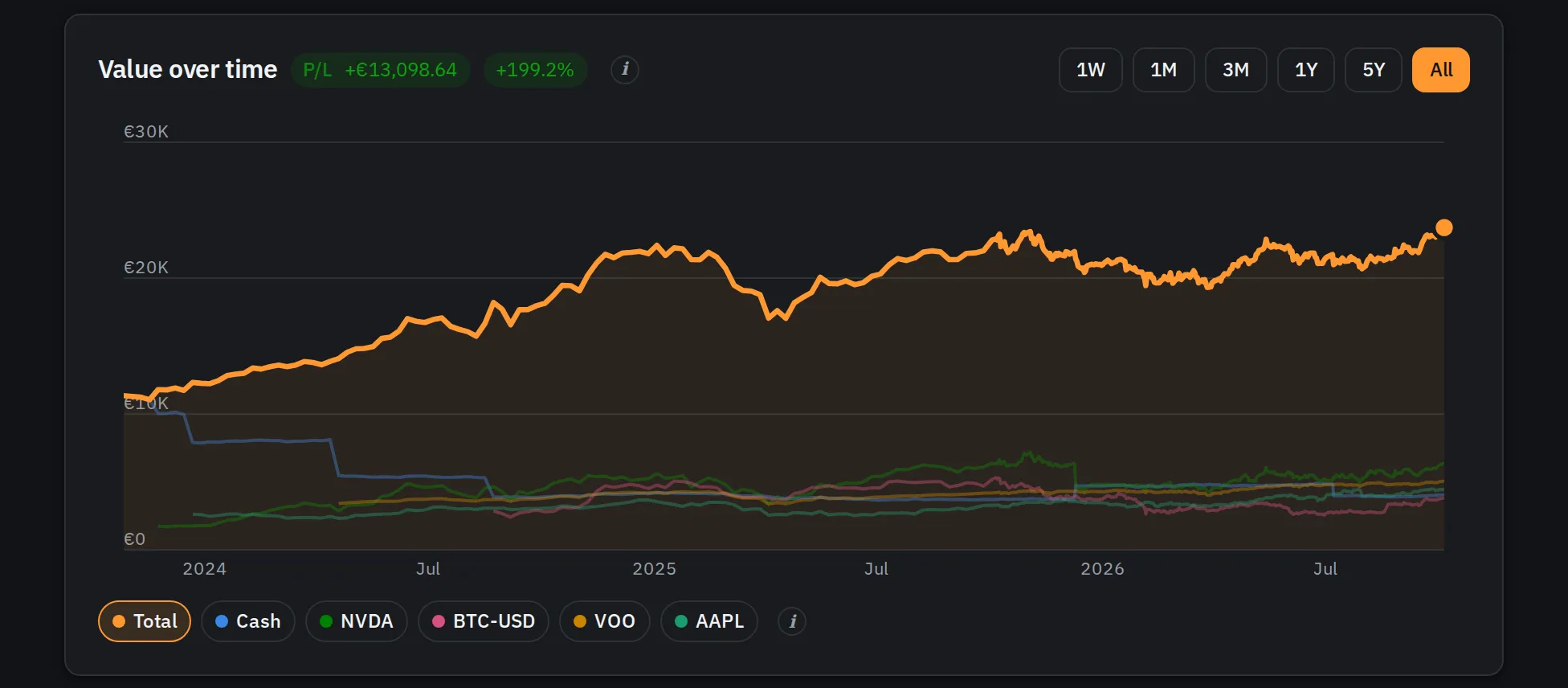
Moneytrac: one honest picture of everything I own
Why I built a self-hosted tracker for investments, pensions and cash across brokers and currencies, what it does, and the decisions behind it.
My savings live in too many places: a couple of brokers, a pension, cash accounts, some in euro and some in dollars. Each provider shows its own slice, in its own way, with its own idea of what “performance” means. For years the full picture was a spreadsheet I updated when I remembered to, which meant it was usually out of date, and occasionally just wrong.
So I built Moneytrac: a small web app, running on my own servers at home, that brings it all together. It isn’t a trading tool and it gives no advice. It answers one question well: what do I have, where, and how is it doing?
This post covers what it does and the decisions behind it. Later posts go deeper into the components and into the infrastructure it runs on.
Every screenshot here shows made-up demo data. The numbered blue markers are mine, not part of the app.
The first screen#
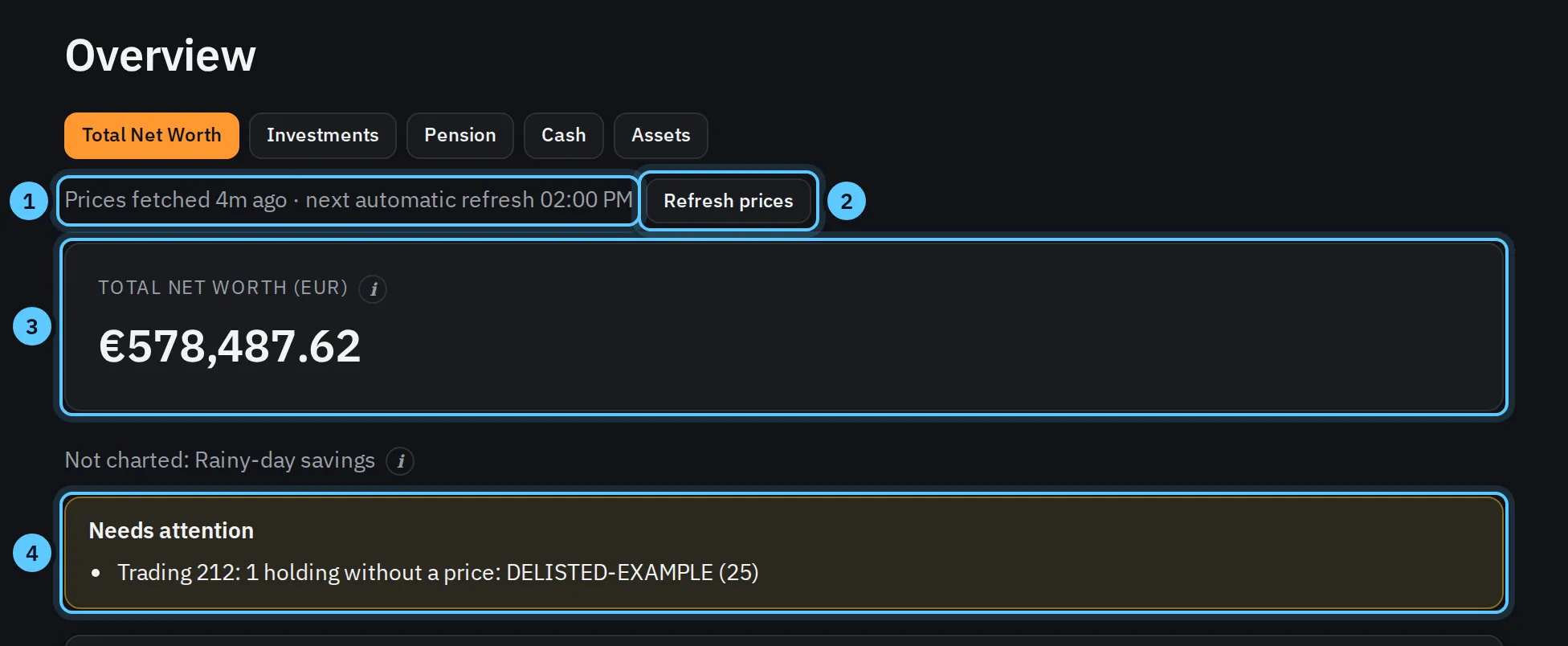
- When prices were fetched, and when the next refresh is. Prices are refreshed at fixed times, and the app says so instead of pretending they’re live.
- Refresh prices, only for admins and rate-limited (more on why below).
- Every total is in one currency. Euros and dollars are never added together; a dollar holding inside a euro account is converted with a stored daily exchange rate.
- Problems are listed, not hidden. Here a holding has no price (it was delisted), so its value is left out and the app says so. It never guesses a price.
What it does#
Brings in history from what brokers already give you#
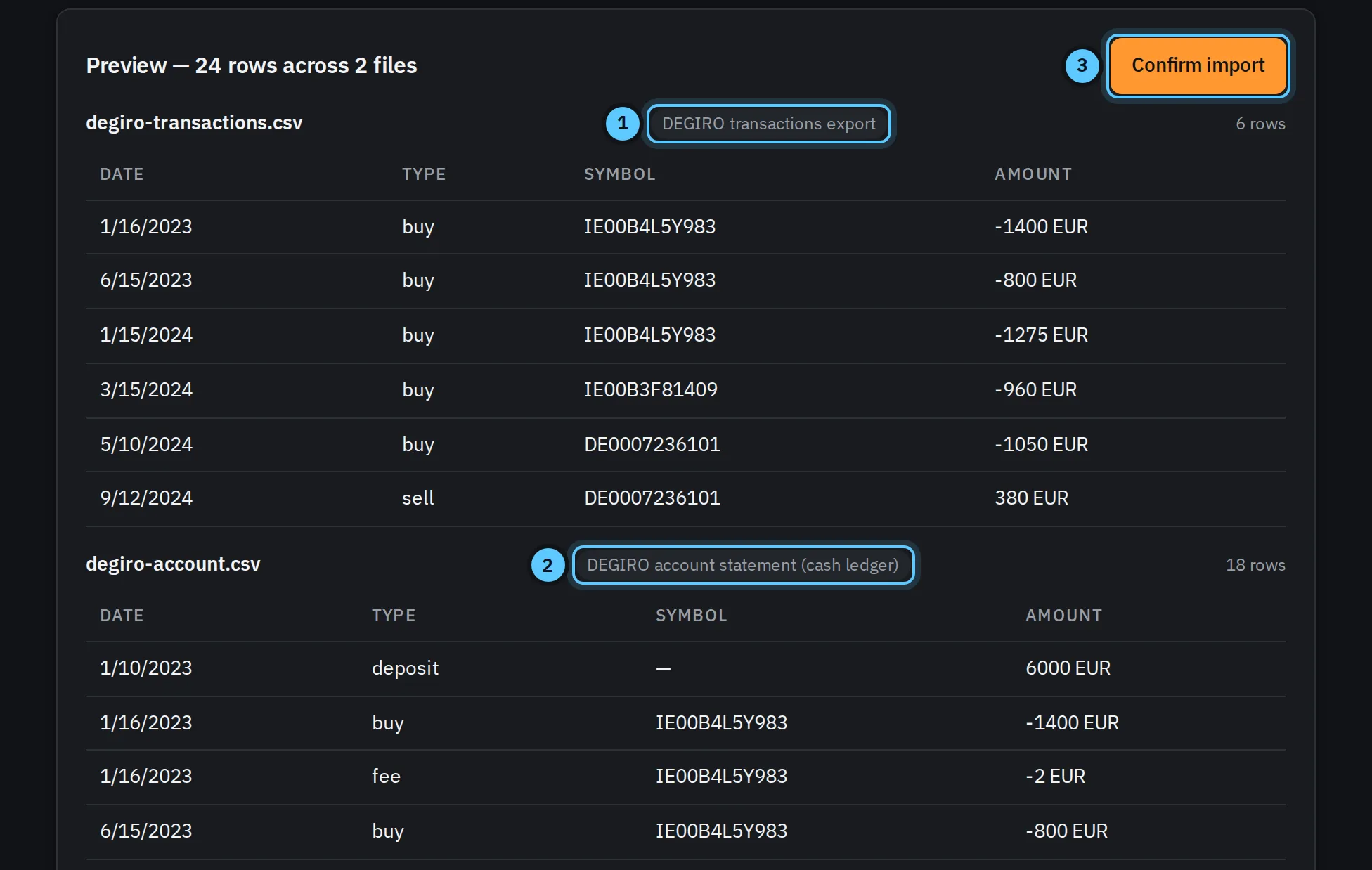
- Each file’s format is recognised on its own: here a DEGIRO transactions export…
- …and a DEGIRO account statement, uploaded together. Interactive Brokers, Trading 212 and Morgan Stanley reports work too, plus a simple CSV for anything else.
- Nothing is saved until you confirm. And importing the same file twice never duplicates anything: every transaction is recognised by the broker’s own ID, so I can re-import whenever I like.
Works out what you hold, and keeps prices honest#
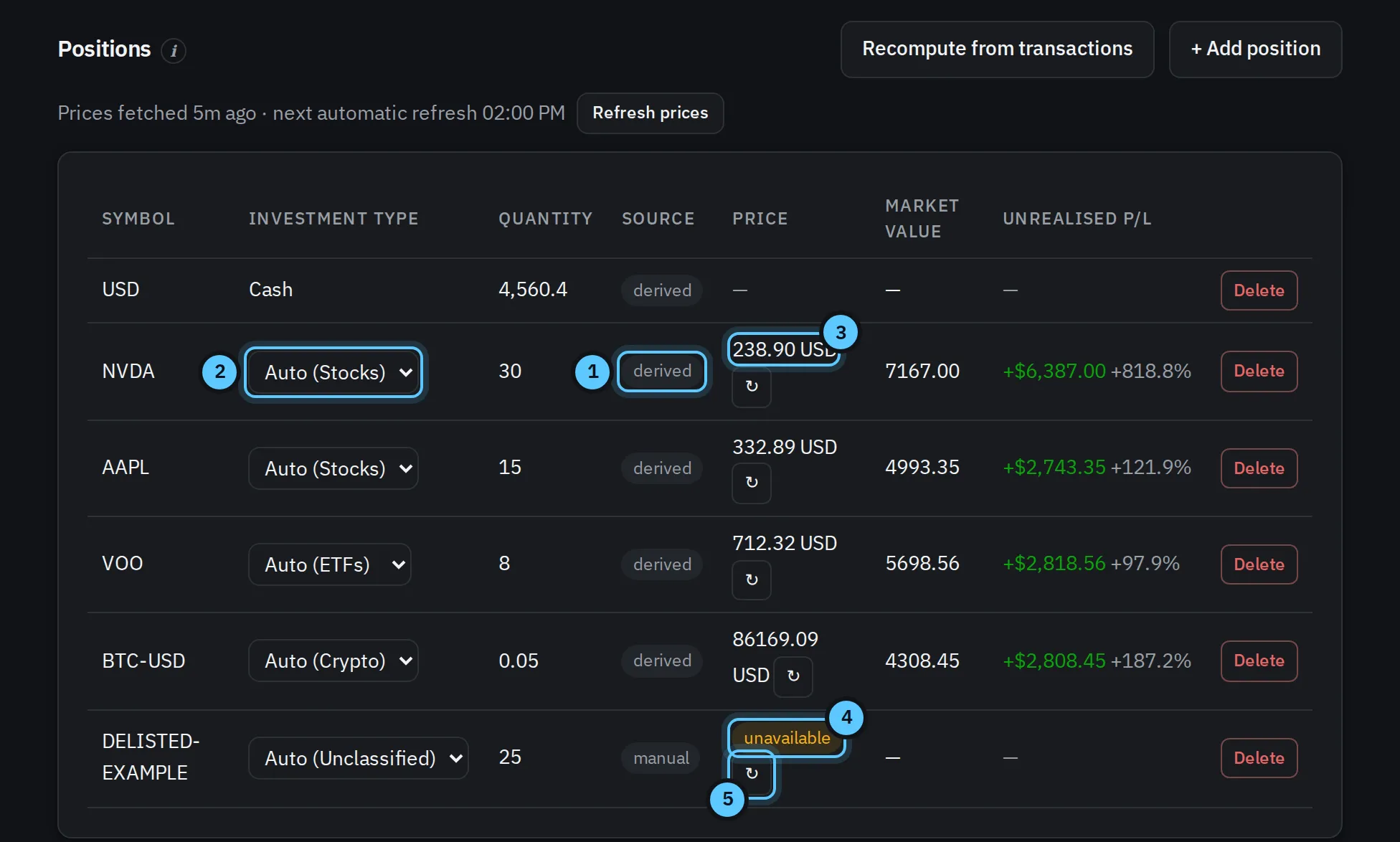
- Positions are worked out from transactions (“derived”), so what I hold can’t quietly drift away from what I bought and sold. Things with no transactions, like a pension balance, are typed in by hand.
- Investment type comes from the price provider (stock, ETF, fund, crypto…), and I can override it, for example to mark a bond ETF as bonds.
- Prices stay in their own currency. This account is in euro; the stock is priced in dollars and converted with that day’s stored rate.
- Every price says how fresh it is: live, stale or unavailable.
- A manual refresh per holding, for admins only.
Shows the full picture, and projects forward honestly#
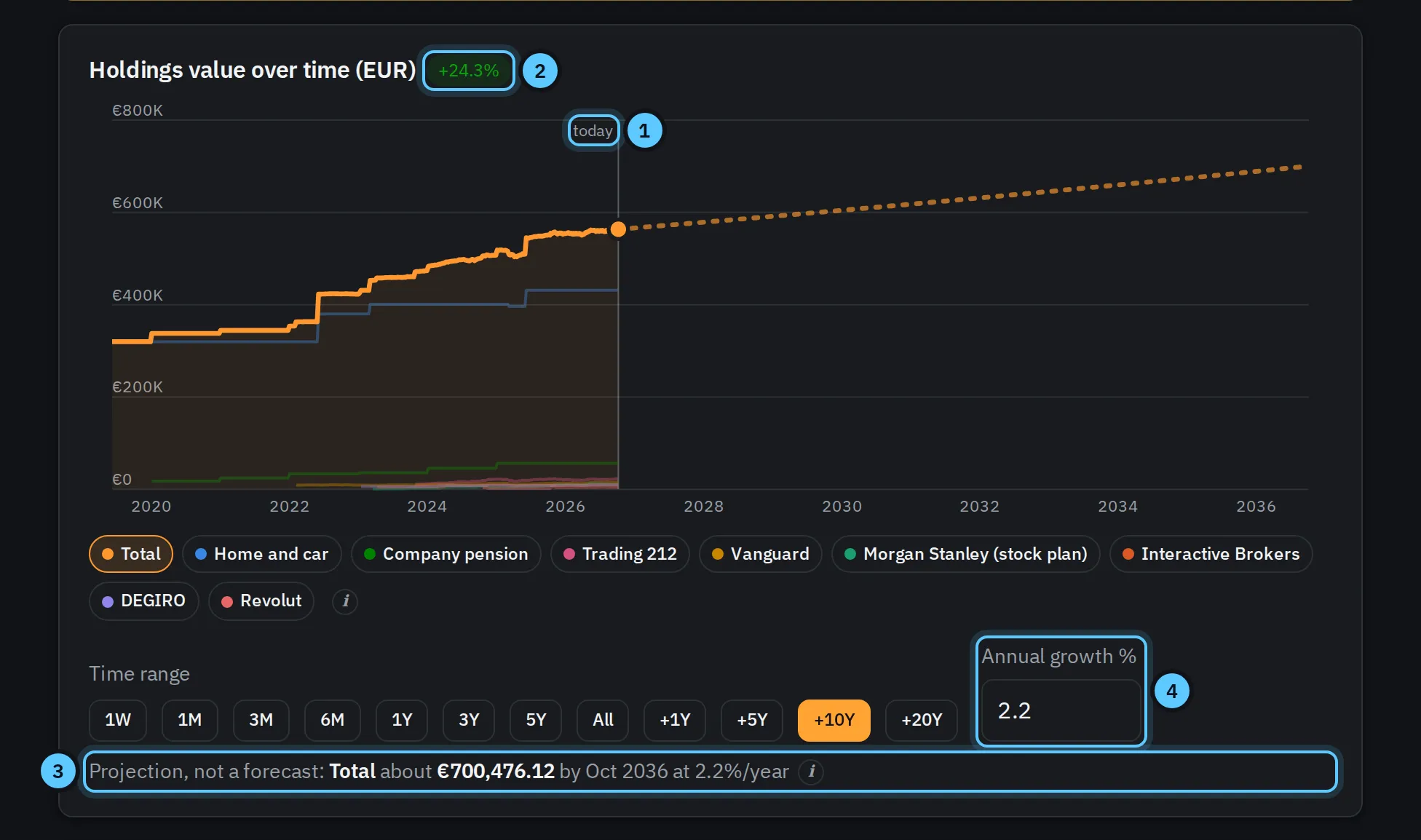
- Where real data ends. Everything right of this line is a projection, drawn dashed.
- The return is measured from prices, not balances, so money I pay in never counts as performance.
- “Projection, not a forecast” is written right under the chart, because it isn’t one.
- The growth rate is estimated from past prices, and I can change it to see other scenarios.
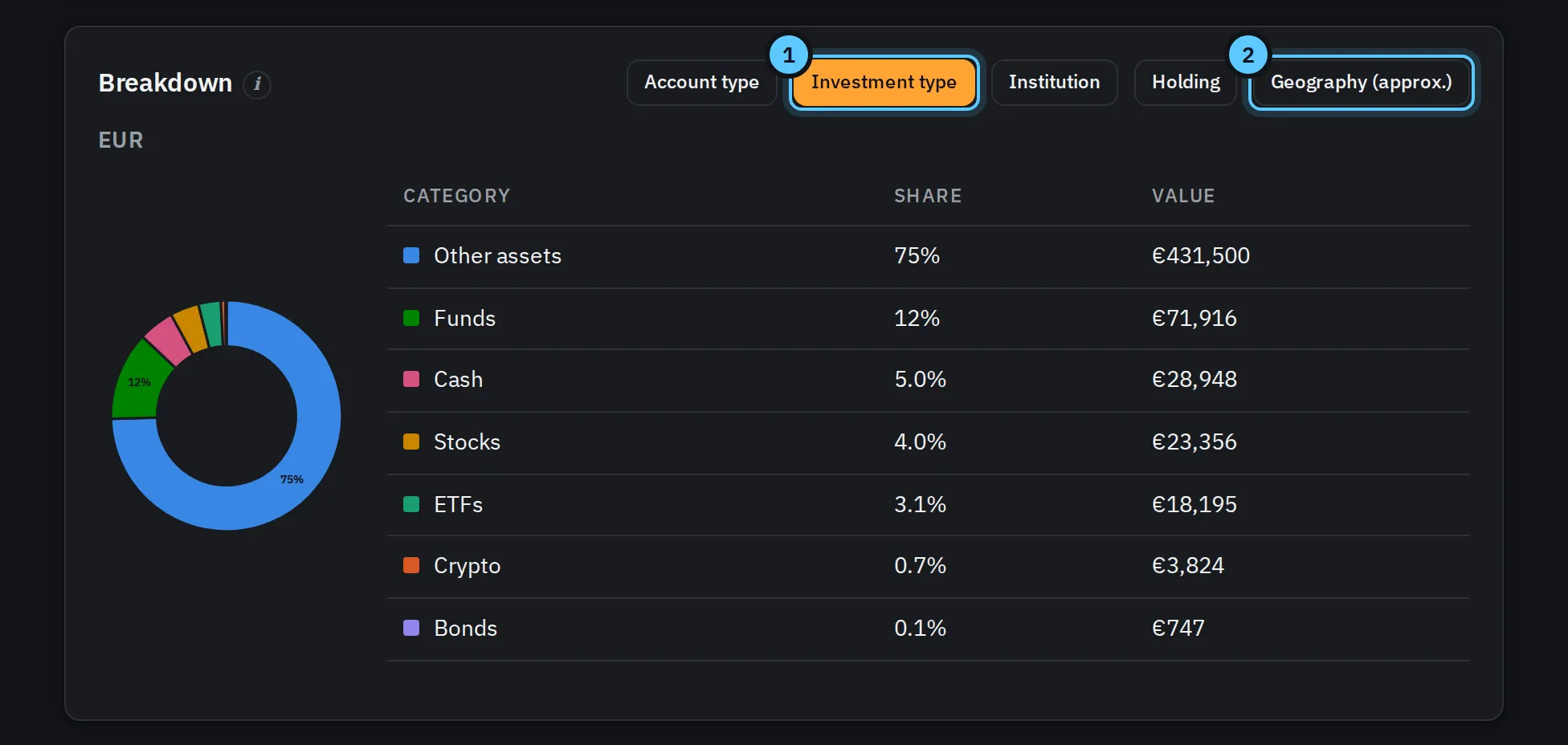
- Five ways to slice it: by account type, investment type, institution, single holding or region.
- Region is approximate, and labelled that way: it’s worked out from where a holding is listed, which is a rough guide at best.
The decisions behind it#
Prices: a free source, used as if it might disappear#
Prices come from Yahoo Finance. It’s free, needs no key, and covers stocks, funds and exchange rates. But it’s an unofficial service: there’s no contract, the endpoints can change, and it can block anyone who asks too often. So I treat it as fragile and borrowed, not as something to lean on:
- Pages never call it. Opening the app only reads prices already stored in the database. Prices are fetched in the background, at known times, and nowhere else.
- Fixed times, not “every few minutes”. On weekdays there are ten refreshes, from just after the European markets open to just after the US markets close. At weekends there’s one, at midday: stock markets are closed, so more would only fetch the same numbers again, while a single refresh still catches what does move, like crypto.
- As few requests as possible. Each holding’s ticker and currency are looked up once and remembered forever, and up to 20 holdings are priced in a single request. A whole scheduled refresh of my own portfolio is one request.
- A quota for anything done by hand. The Refresh prices button is for admins only, and limited to 6 refreshes per holding per hour, counted across all users, because Yahoo sees requests per symbol, not per user. If the quota counter itself is unavailable, manual refresh is switched off rather than allowed without limits.
- Every request is logged, so I can always answer “how much did we ask for today, and why?”.
- “Stale” means a refresh was missed, not “old”. A price fetched at 9 pm is still exactly as current as intended at 7 the next morning, so it isn’t flagged overnight. If a scheduled refresh fails, the affected prices are marked stale within half an hour.
- Swappable. All of this sits behind one small interface, so moving to a paid, documented provider would mean replacing one piece, not the app.
Brokers: their official exports, not unofficial APIs#
Some brokers can be connected directly, but often only through unofficial APIs: you hand over your login (sometimes including the two-factor secret), and the integration breaks whenever the broker changes its site. The code for two broker connections exists, but it’s switched off, and the app refuses to start if anyone configures it. Instead, data comes from the exports brokers officially provide: stable formats, no passwords stored anywhere, and a file I can look at before importing.
Numbers: strict about what a number means#
- One currency per account, never mixed. Each account declares its currency; foreign holdings inside it are converted with stored daily rates. If a rate is missing, the total isn’t shown, rather than being shown wrong.
- Missing stays missing. No price means no value, plus a warning, never a guess.
- Performance from prices. Each holding’s own price change, weighted by what it’s worth today. A deposit isn’t a gain.
- Safe to repeat. Imports, syncs and rebuilds can all run twice without changing anything the second time.
Privacy: my data stays at home#
It runs on a small cluster in my house. The price provider only ever learns which securities to price, never who holds them or how many. Each user’s data is separated in every database query, and asking for someone else’s account gets “not found”, not even “forbidden”.
Written down as it’s built#
Every decision, known gap and procedure is documented: what the app does, why, how to release it and how to roll it back. Someone new, or me in a year, can pick it up without asking anyone.
The hard part wasn’t the charts. It was being strict about what a number means: which currency it’s in, how old its price is, and whether a “gain” is a market move or just a deposit.
How it’s built#
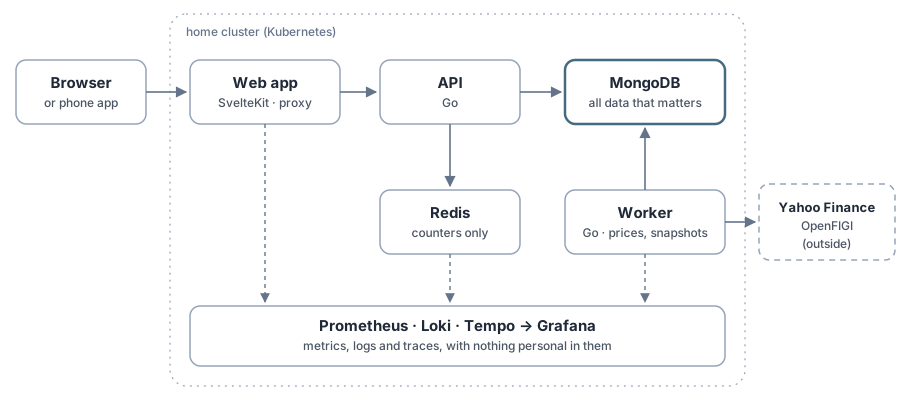
Five small pieces, each with one job:
- Web app (SvelteKit), installable on a phone like an app. The browser only ever talks to the app’s own address; the app’s server passes requests on to the API. No cross-site calls, nothing for a phone’s browser to block, and the API is never exposed directly.
- API (Go): login, accounts, imports, and every calculation that needs stored data. It never calls the price provider while you wait, except for a holding it has never seen and an admin’s manual refresh.
- Background worker (Go too): the scheduled price refreshes, the daily snapshot that feeds the charts, and pricing new holdings as soon as they appear.
- MongoDB: everything that matters.
- Redis: a few counters that are fine to lose.
Each gets a deep dive later in the series. Here’s why the two databases are the way they are.
Why MongoDB is good enough#
The honest answer is that the data is small and the questions are simple. One person’s finances are a handful of accounts, some hundreds or thousands of transactions, and a daily price for each security held: about 2,500 price points per security for ten years. Every question the app asks is “this user’s accounts” or “this account’s transactions”; there’s no cross-user reporting and no big joins.
For that shape, MongoDB gives me what I actually need:
- Guarantees from indexes, not from code. A transaction is unique per broker and broker ID, a position per account and symbol. The database refuses duplicates, which is what makes re-importing the same file safe.
- A time-series collection for the daily snapshots behind every chart, built in, with no extra service.
- Additive changes for free. New fields and collections are simply ignored by older code, so any earlier version can run on today’s data and a rollback never needs a data migration. I keep it that way on purpose: data is only ever added in one release and cleaned up in a later one.
- Atomic single-document writes cover every update the app makes; it doesn’t need multi-document transactions.
Would PostgreSQL work? Of course, and if the app ever grows into real multi-user reporting, a relational database is where I’d look first. At this size the difference doesn’t matter, and the simplest thing that gives the guarantees above wins.
Redis: needed, or just familiar?#
Redis was originally a price cache: any page load could fetch prices, cached for ten minutes. When prices moved into MongoDB (they have to survive restarts once they’re fetched only a few times a day), the cache went, but Redis stayed for one kind of job: counters that must be checked and updated in one step, by many requests at once.
- The manual-refresh quota: at most 6 refreshes per holding per hour. Two clicks at the same moment must not both take the last slot. A small script runs inside Redis that drops old entries, checks the count and takes a slot in a single call, and says exactly when the next slot frees up.
- Login and signup limits: attempts per network address, emails per email address, and a temporary lockout after repeated failed logins, shared by every copy of the API.
That’s the case for it. Looking at it critically, it’s weaker than it sounds:
- It’s a whole extra service for two small jobs: another container to run, update, monitor and back up, another thing that can be down. It even has its own replicated disk, for data I describe as disposable.
- MongoDB could do both. A single document per holding, updated with one conditional write (“add a timestamp only if there are fewer than six recent ones”), is just as atomic. Expiring counters are what MongoDB’s TTL indexes are for, and the app already uses them for sessions and emailed links. The original reason for picking Redis, that the check and the update must happen in one step, doesn’t actually require Redis.
- Its speed doesn’t matter here. A few logins and the odd refresh click a day are nowhere near what MongoDB handles without noticing.
- “Shared by every copy of the API” is a future benefit. Today there is one copy of the API, and other parts (import previews kept in memory) already stop me from running two.
- The failure mode is uncomfortable. If Redis is down, the login limits simply stop applying, so the app keeps working rather than locking everyone out. That’s a deliberate choice, but it means the protection can disappear silently, and nothing alerts me about it yet.
So why keep it? It works, it’s tested, at home it costs nothing to run, and it’s the standard tool if the app ever needs several API copies. But if I started again today, I’d begin with MongoDB alone and add Redis only when a measurement asked for it. Moving the counters into MongoDB, and removing a service, is on the list.
What running at home made easy#
Some choices were obvious only because it runs on my own small Kubernetes cluster instead of a cloud account:
- No bill per service. Running my own MongoDB, Redis, Prometheus, Loki and Tempo costs nothing extra, so the app had full metrics, logs and traces from early on, instead of “later, when it’s worth paying for”.
- A permanent staging copy with made-up data, always on, at no cost. Every change runs there first; production only moves when I merge a release.
- One copy of each database is enough. The disks underneath are replicated across two machines and backed up nightly, a restart takes seconds, and a few minutes of downtime on a personal app is fine.
- Nothing exposed directly. The app is reached through a Cloudflare tunnel, with no open ports on my router, and it sits behind a login wall until it’s ready for anyone else.
- My data never leaves the house, apart from the names of the securities to price.
How all of that is set up, from the cluster to automatic deployments, is its own post.
Next: measuring instead of guessing#
Because every request carries one trace ID, from the web app’s server through the API down to each database query, I can see where the time goes instead of guessing. The first fix that came out of it: pages that value many holdings were reading prices one at a time. Loading them in batches, with a small per-request cache, took the same set of requests on the staging copy from 273 database reads to 181, net worth from 21 to 6 ms and the breakdown from 41 to 6 ms, with every response identical before and after.
The slowest part now is the long-range chart: its median is around a tenth of a second, but about one request in four takes a quarter to half a second. A trace of one such request shows most of the time going into loading and decoding the stored points; the database query itself is only about a quarter of it. The options are clear (keep exchange-rate history in memory, store pre-summarised weekly points for old history, or one history request for all accounts), and the plan is to compare traces before and after each one rather than pick by instinct.
Two more things are still to come, each in its own article:
- End-to-end performance: what a reader actually waits for, from tap to chart, not just the server’s share.
- Load and stress testing: pushing it with many simulated users to see what breaks first. I already know a couple of candidates: import previews live in the API’s memory, which rules out running two copies of the API, and there’s a single MongoDB.
It works on a phone, too#
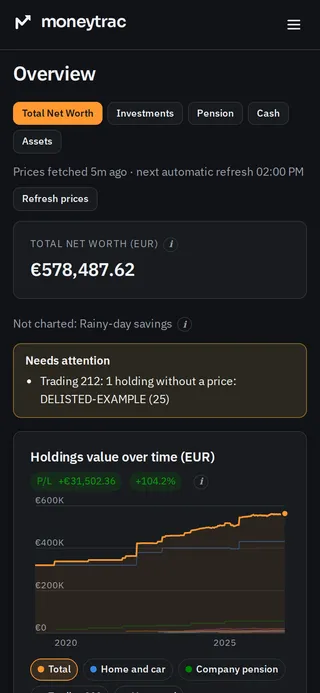
It installs like an app from the browser, so checking where things stand takes a few seconds, wherever I am.
Next in this series#
- Building it with an AI pair programmer: what worked, what didn’t, and the rules that kept it on track.
- The components in depth: Go, MongoDB, Redis and SvelteKit.
- Getting the money maths right: currencies, returns, and realised versus unrealised profit.
- The infrastructure: a home Kubernetes cluster, deployments from git, and a staging copy.
- Observability for a one-person app: knowing what’s going on without collecting anything personal.
- Finding a performance bug with data, not guesses: the trace comparison above, in detail.
- End-to-end performance and load testing.