Why I run Kubernetes at home
Two ThinkCentres and a Raspberry Pi: why Kubernetes and not just Docker, why three machines, the storage, and the platform practices it runs on.
Most of what I build in my own time runs on a small cluster at home: my finance tracker, this blog, a quiz app for SREs, the house’s home automation, a media server, and the monitoring that watches all of it. Two small Lenovo ThinkCentres and a Raspberry Pi, running Kubernetes.
This is the first of two posts about it, and I’m going to judge it the way I’d judge a production system at work. Not a global one: there’s one house, one power circuit and one internet connection, and no amount of YAML changes that. But inside those walls, reliability and automation are the point of the whole thing, not an afterthought.
This one is about the why: why a home lab, why Kubernetes, why the machines and the storage are the way they are, and the practices I run it with.
Why a home lab at all#
It started with my house alarm. I wanted it to arm itself when we left and disarm when we came home, and the way to do that was Home Assistant. This was before I could ask an AI for help, so it took me three days of forum threads, configuration files and reboots to get it running. Today Home Assistant is just one more resident of the cluster, sharing it with everything else.
I learn by running things. Reading about distributed storage teaches me the words; losing a database to a power cut teaches me the subject. A home lab is the only place where I own every layer, from the power socket to the dashboard, and where nobody else has already solved the hard part for me.
It’s also where my side projects live. I want them to run somewhere that behaves like a real environment, with releases, rollbacks, alerts and post-mortems, so that what I practise at home is what I’d do at work.
“You don’t need Kubernetes”#
Every time a home lab with Kubernetes shows up online, the same comment follows, usually from someone who runs clusters for a living: you don’t need Kubernetes for this, just use Docker.
They’re right that I don’t need it. Docker Compose on one box would run my apps. But “need” was never the question, and I find the comment a bit tiring, for three reasons.
Learning is the point. A home lab isn’t a cost-optimised production deployment. It’s a place to learn. “You don’t need it” is advice for someone shipping a product on a budget, not for someone who wants to understand how the thing works by running it, breaking it and fixing it. Telling people not to learn the tool you use every day is a strange way to protect the craft.
One box isn’t the simpler option once you want what I want. I want the apps to survive a machine dying, changes to be reviewed and reversible, and the whole setup to be rebuildable from a description. On a single Docker host, each of those is a script I’d write and maintain myself. In Kubernetes they’re the default way of working: two copies of a service on two machines is one line; what’s running is whatever the description says.
It’s not that much. With microk8s the cluster itself is a single install, and DNS, load balancing and Helm are add-ons switched on with one command. Most of my time goes into the apps and their reliability, not into the cluster’s plumbing.
I’d still give the same advice to a small company with one app and no one to run a cluster: use the boring option. That’s a different situation.
Why three machines#
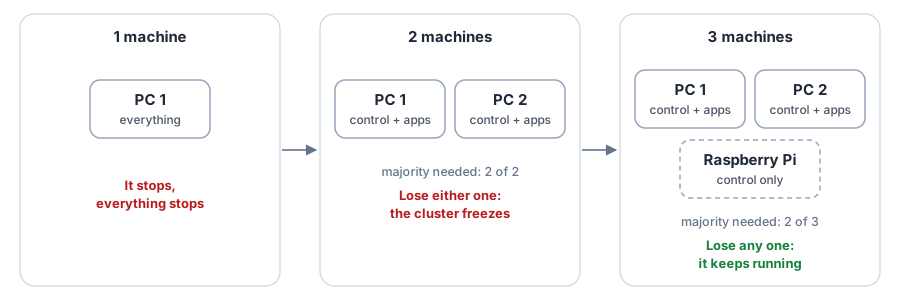
It started on one machine. That’s fine until it isn’t: when it stops, for an update, a crash or a power cut, everything stops with it.
After putting real time into building a cluster, I couldn’t accept taking all of it offline just to reboot for an update or an upgrade. That’s what pushed me to a second machine.
A second machine looks like the fix, and it’s a trap. Kubernetes keeps its own state in a small database spread over the control-plane machines, and it only accepts changes while a majority of them agree. With two machines the majority is two: lose either one and the cluster freezes. Two machines can be less available than one, because there are now two things that can break it.
The third machine is what makes it work: the majority is two of three, so any one machine can go and the cluster carries on. Updates become boring: I empty one machine, update and reboot it, bring it back, and move to the next, while everything keeps running.
Why two ThinkCentres and a Pi#
The third vote doesn’t need to be powerful, so the three machines aren’t equal, on purpose:
| Machine | What it is | What it does |
|---|---|---|
| ThinkCentre ×2 | small desktop PCs, 6 cores, 16 GB each | run every app, and hold the replicated storage |
| Raspberry Pi | 4 cores, 4 GB, ARM | the third vote; serves the external disk for media and backups; talks to the UPS |
The ThinkCentres are the kind of small office PC companies replace every few years: quiet, low power, cheap second-hand, and with real x86 cores and room for more memory. Two of them give me enough capacity to run everything on one if the other is down, which is the test that matters.
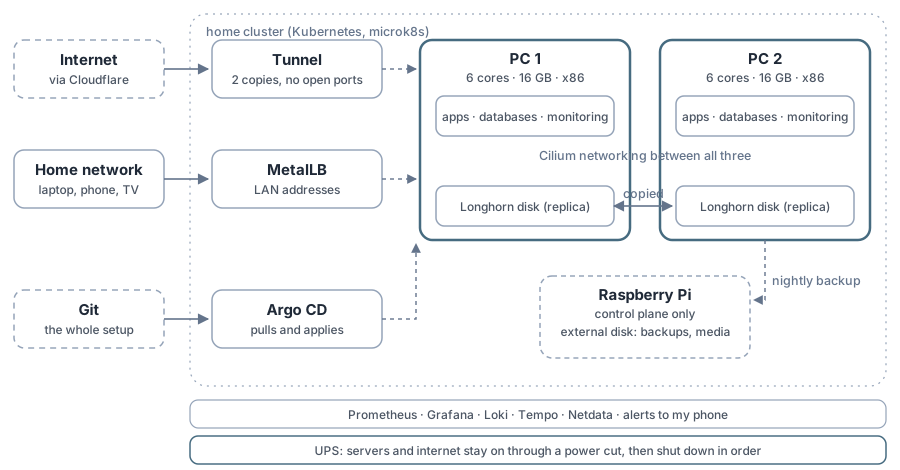
The Pi is the cheapest way to get the third vote. It runs no apps (they’re kept off it on purpose: 4 GB doesn’t leave much room, and I don’t want an app’s memory spike to take out a control-plane vote), and it does the jobs that suit an always-on, low-power box: it serves a disk over the network and listens to the UPS.
All of it cost about €600 in hardware, and it costs me roughly €7 to €8 a month to run. I’m not trying to earn that back: this is a hobby, not an investment, and so far it’s been worth every euro.
Why distributed storage#
Apps that keep data (databases, mostly) store it on Longhorn, a storage system that runs inside the cluster. Every volume has two copies, one on each ThinkCentre, kept in step as writes happen.
What that buys me:
- A machine can die without losing data. The app restarts on the other machine and finds its disk there, usually within a minute or two.
- Maintenance without downtime for data. I can reboot one machine; the volume carries on from the other copy, and Longhorn rebuilds the second copy when it comes back.
- Nightly backups for free. Every volume is backed up at night to the Pi’s disk, seven days kept.
What it doesn’t buy me, and this is the part people skip:
- It’s not a backup. Delete a table and both copies delete it, at the same moment.
- It doesn’t make a power cut safe. Both copies can go down mid-write. I learned that the expensive way: a power cut cost me most of a day’s data. That story is in the next post.
- It costs something. Replication uses network and disk on every write, and when a machine has been away for a while, rebuilding its copies is heavy work that I can see in the response times.
I chose two copies, not three, because there are only two machines that hold data. A third copy on the same two machines would protect against a disk failing, not a machine, and it isn’t worth the space.
Why the media sits on a disk on the Pi, not a NAS (yet)#
The media library for Plex doesn’t live in Longhorn. It’s on an external disk plugged into the Pi and shared over the network (NFS). Plex mounts it like any other folder.
Why not replicated storage? Media is large, it’s replaceable, and it’s read far more than written. Two copies of hundreds of gigabytes of films would cost more disk than the ThinkCentres have, to protect something I could rebuild. Plex’s own small database, which isn’t replaceable, does live in Longhorn.
Why not a proper NAS? Because a NAS is a decision I want to make well, not quickly. A dedicated box with several disks would fix real problems today: one disk is one point of failure, the Pi’s USB port is not a storage controller, and the nightly backups live on that same disk, in the same house, on the same UPS. But a good one is around €1,000, and I’d rather spend that once I know what I need from it than buy something and design around it.
What will tip it is Google Drive. I pay about €100 a year for it, and the day I get tired of that bill, a NAS is the obvious next step. Not for privacy, which doesn’t worry me much there, but because it’s the next piece of a home setup that keeps getting more ambitious.
So it’s on the list of known gaps, written down, with the risk spelled out. That’s the honest version of “not yet”.
What runs on it today#
The numbers, as of this week:
| Pods running | about 110 |
| Apps managed from git | 31 |
| Namespaces | 22 |
| Replicated volumes | 26 |
| Network policies | 54, across 10 namespaces |
| Alert rules | 16, each with a playbook |
| Incident reports | 5 |
What depends on it:
- My own apps, each with a production and a staging copy: Moneytrac (my finance tracker), MTTK (a daily quiz for SREs and platform engineers) and this blog.
- The house. Home Assistant moved from a virtual machine into the cluster this month. That raised the stakes: if the cluster is down, the lights still work, but the automations don’t.
- Media: Plex, and the downloads that feed it, behind a VPN.
- Day-to-day tools: a code editor in the browser, a logger for the car, a subnet router for reaching home from outside.
- The platform itself: Argo CD, Prometheus, Grafana, Loki, Tempo, and a few small jobs that check the nodes and the internet exposure.
The same cupboard also builds and tests every change: the CI for all my repositories runs on one of the ThinkCentres, not on rented machines.
The platform practices#
None of this is exotic. It’s the list I’d expect from any platform team, applied to a cupboard.
Everything in git, applied by Argo CD. The whole cluster is described in one repository. Argo CD runs inside the cluster and keeps the two in step: I change a file, open a pull request, merge it, and it’s deployed within minutes. If I change something by hand, Argo CD puts it back within seconds. What’s in git is what runs.
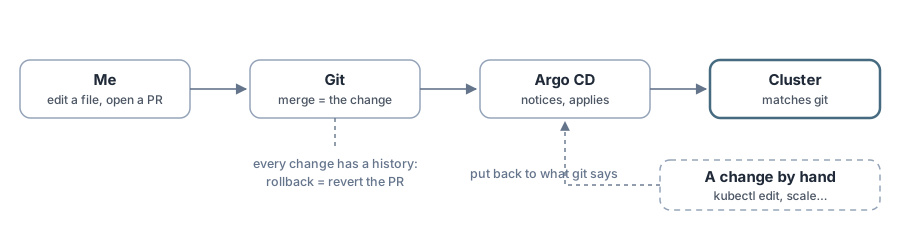
Careful defaults for data. Every app syncs automatically, but apps that hold data never delete anything just because it disappeared from git: Argo CD flags it and waits for me. Two apps, the internet edge and Home Assistant, only change when I press the button, because a change there takes something visible offline.
Helm where it helps, plain files where it doesn’t. Big third-party systems (Longhorn, Cilium, the canary controller) come as Helm charts with their settings in git. My own apps are plain manifests with small per-environment overlays (Kustomize), so the difference between staging and production is a few lines I can read.
Nothing changes under me. Every container image is pinned to an exact version, most of them to an exact build fingerprint. A check on every pull request rejects an image that could change under the same name, and a bot (Renovate) opens pull requests when new versions come out. Updates arrive as changes I review, never by surprise.
No open ports. The router forwards nothing. Public sites reach the cluster through a Cloudflare tunnel that the cluster opens outwards, and admin pages sit behind Cloudflare’s login. A job checks every Monday that what’s public is what’s meant to be public, and alerts if not.
Network policies, deny by default. The apps that matter start from “nothing can talk to this”, then allow exactly what’s needed: the web front end can reach the API, the API can reach its database, and the database can be reached by nothing else. 54 policies so far, across the production and staging copies of every app I wrote, Argo CD and the node checks. The older third-party apps are next.
Staging that gets everything first. My apps’ releases go to staging automatically, get tested there, and only then does a pull request appear saying “production → this version”. Merging it is the release. MTTK goes one step further: a new version takes a small share of real traffic first, and is rolled back automatically if its error rate or response time is worse than the current one.
Secrets by hand, never in git. They’re created once, by me, in the namespace that uses them. When a security review this month found a few old credentials in git, they got an issue: they were moved out within days, most were changed the same week, and the rest are on the list. Every pull request is now scanned for secrets, and every image and dependency for known security holes, before anything is released.
Next: running it, and breaking it on purpose#
This post was about the design. The next one is about what happens when it meets reality: the day the network under everything had to be replaced, the power cut that wiped a database and the UPS test that found five bugs in a script I trusted, the only alerts I allow to wake me up, and what happened when I broke it on purpose. It ends with an honest scorecard: what would pass as production at work, and what wouldn’t.